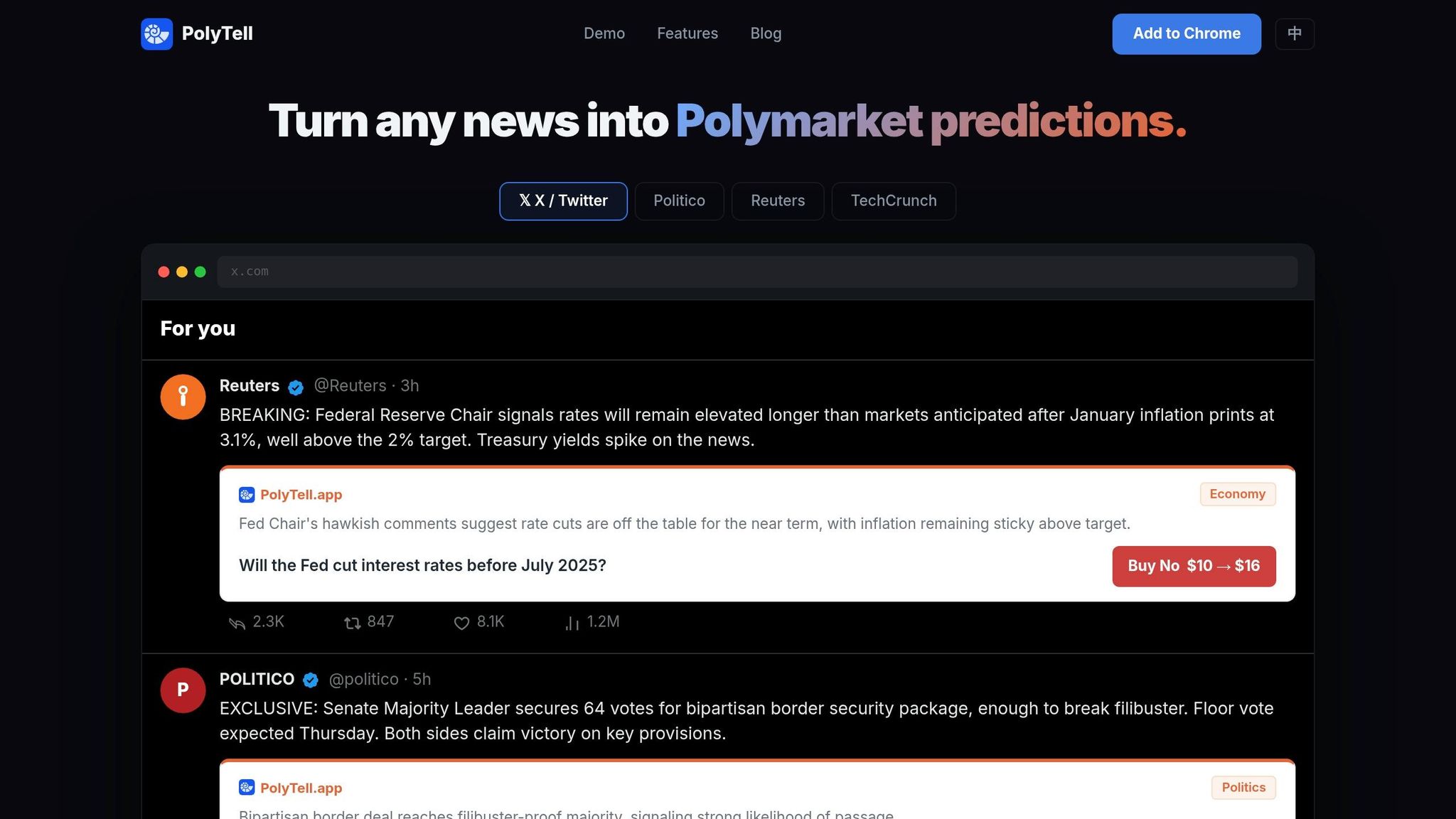
Prediction markets like Polymarket let you see real-time odds on future events, driven by actual trades. These odds often react to breaking news faster than traditional media, offering a new way to understand the news. But switching between news sites and Polymarket can be a hassle. Enter PolyTell, a Chrome extension that embeds live Polymarket odds directly into the articles and feeds you're reading, such as Reuters, BBC, or X (formerly Twitter).
PolyTell is easy to install, works with Chrome-based browsers, and supports both English and Chinese. It requires no setup after installation and prioritizes privacy by not collecting personal data. With PolyTell, you can compare news narratives with market-driven insights without interruptions.
Installing the PolyTell Chrome Extension
Installation Steps
Getting PolyTell up and running is quick and easy. Head over to the official website at polytell.app or search for "PolyTell" in the Chrome Web Store. Once you find it, click the "Add to Chrome" button to start the installation process. A permissions prompt will pop up, asking for access to read and modify data on all websites. This step is essential for PolyTell's AI to analyze article text and social feeds, allowing it to identify events that align with live Polymarket contracts.
After granting permissions by clicking "Add extension", the installation completes in seconds, and the PolyTell icon will appear in your browser toolbar. No account registration or sign-up is required. To confirm the extension is working, visit a news site — you'll see inline prediction cards displaying market data.
Browser Compatibility Requirements
PolyTell works with Google Chrome and other Chromium-based browsers like Microsoft Edge and Brave. To ensure everything runs smoothly, your browser must be version 110 or higher. You can check your current version by typing chrome://settings/help into the address bar — Chrome will display your version and update itself automatically if needed.
- Google Chrome, Microsoft Edge, Brave (version 110+)
- Supports English and Chinese interfaces
- Works on infinite-scroll platforms like X and Reddit
- No extra setup required after installation
Configuring PolyTell Settings
Choosing Your Language
PolyTell automatically detects the primary language of your browser, supporting both English and Chinese. If the interface displays in a language you didn't expect, navigate to chrome://settings/languages and reload the page to apply the correct setting.
Setting Default Bet Amounts and Site Preferences
Once your language settings are in place, you can customize your betting preferences. PolyTell integrates effortlessly with major news platforms and infinite-scroll feeds. It works across sources such as Reuters, BBC, TechCrunch, and Politico, with no additional setup required for individual sites.
To configure your default bet amount, click on the PolyTell icon in your browser toolbar. From there, choose your quick-bet amount — for instance, $10 — which lets you place bets instantly using inline prediction cards. After setup, PolyTell will automatically match events with live Polymarket contracts as you browse.
Tracking Polymarket Odds While Reading News
Reading Inline Prediction Cards
Imagine reading your favorite news site — whether it's Reuters, BBC, or Politico — and seeing live market odds pop up right where they're relevant. That's exactly what PolyTell's AI does. As you read, it scans the article in real time, identifying key events and matching them to live Polymarket contracts. When it finds something, an inline prediction card appears right below the relevant paragraph.
These cards are packed with information: they show the market question, the current probability percentages, and a Buy button that highlights your potential payout. For example, you might see something like "$10 → $16", giving you a quick snapshot of the risk-to-reward ratio. In one demo, PolyTell identified five events in a single news article within seconds.
Placing Bets Without Leaving the Page
What makes this tool even more powerful is its single-click betting feature. Each prediction card comes with a Buy button, allowing you to place a trade instantly without ever leaving the article. Once you set your default bet amount (say, $10) in the toolbar settings, all it takes is a click to execute the trade. No need to open a new tab or hunt for the right market.
This tight integration means you can stay immersed in your reading while taking advantage of market opportunities as they arise — no interruptions, no distractions.
Monitoring Feeds That Auto-Update
PolyTell doesn't stop at static articles. It also works seamlessly with dynamic feeds like X (formerly Twitter) and Reddit. As you scroll through these platforms, PolyTell scans the content in real time, updating odds and making recommendations on the fly. In tests, it generated 10 bet suggestions from an X timeline in just a few seconds.
The extension works quietly in the background, constantly scanning for new content and updating market data without requiring you to refresh the page. It's like having a personal assistant that keeps you informed and ready to act at any moment.
Advanced PolyTell Features
How AI Matches Events to Markets
PolyTell's AI works in real-time to analyze webpage text and URLs, identifying key events like Federal Reserve decisions, Senate votes, or major tech funding announcements. Once the system spots an event, it cross-references it with live Polymarket contracts and inserts an inline card directly beneath the relevant paragraph.
The AI can process infinite-scroll feeds, seamlessly analyzing new posts on platforms like X or Reddit as they appear — no page refresh needed. It supports bilingual content, handling both English and Chinese while automatically adjusting to your browser's language settings.
"PolyTell's AI reads the content, extracts key events, and matches them against live Polymarket markets." — fengyiqicoder, Developer of PolyTell
Supported News Sites and Platforms
PolyTell is designed to adapt effortlessly to different site layouts. Whether you're diving into an investigative article or skimming breaking news alerts, the extension places inline cards exactly where they're most relevant. It scans as you scroll to provide betting recommendations across categories like technology, politics, and business.
Automatic Detection Without Manual Setup
Once you install PolyTell, it gets to work immediately — quietly scanning content in the background and surfacing Polymarket data whenever a match is found. The system prioritizes privacy: it uses a random UUID to manage request rates and does not collect personal details like names, emails, or browsing history. Temporary logs are kept for up to seven days before being deleted.
Conclusion
PolyTell simplifies the process of staying on top of market sentiment by embedding real-time market odds directly into the news you're reading. Forget about constantly switching tabs — PolyTell's AI analyzes articles, extracts key events, and matches them to active markets within seconds. This way, you can keep up with rapid market changes without interrupting your workflow.
"No popups, no tab switching — just read and see the market's take." — PolyTell.app
Compatible with all major news sites, PolyTell supports both English and Chinese interfaces. Once installed, it works automatically, requiring no extra setup. This effortless integration helps you stay informed and make timely decisions based on live market trends while you read.